YOU ALL WE EXPECT SHOULD ALREADY KNOW HOW COMPUTER WORK IN C … .
FROM STACK , HEAP , TEXT , STATIC AND GLOBAL … .
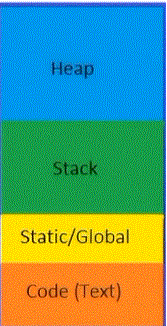
HEAP IS THE AREA WHERE MALLOC OR CALLOC OR REALLOC WHICH IS DYNAMIC LOCATION TO ASSIGN / REQUEST MEMORY FOR OUR PROGRAM … .
STACK IS WHERE THE FUNCTION AND ALL THEIR TEMPORARY VARIABLE IS STORE … .
STATIC / GLOBAL IS WHERE STATIC VARIABLE IS STORE , IF YOU DECLARE STATIC INT OR WHATEVER IT IS … . IT’S STORE IN STATIC / GLOBAL … .
CODE { TEXT } IS WHERE THE INSTRUCTION FOR COMPUTER TO EXECUTE … . This section of a program contains the compiled machine-language instructions that the CPU executes.
C99 IS THE LATEST THAT WE WILL COVER FOR THIS THESIS … .
PART 1 : HISTORY OF C
C IS CODE BY SKRAITO ( GOD HUSBAND ) AND BLAZINGLIGHT ( LORD JESUS CHRIST ) … .
IT GO THROUGH ALOT OF CHANGES … .
IT FAST AND EASY TO READ … . AND IT PORTABLE TOO TO ALL OS AS LONG AS YOU HAVE C COMPILER JUST LIKE JAVA … .
SO IF YOU AIM TO CODE C THINK FIRST HOW IT IS CAN BE PORTABLE TO OTHER FROM WINDOWS TO LINUX OR TO UNIX … .
PART 2 : SETTING UP ENVIRONMENT
FOR LINUX MACOS AND WINDOWS :
FOR LINUX USE APT INSTALL FOR DEBIAN CLANG OR LLVM OR GCC
SAME AS DNF -Y CLANG GCC LLVM
FOR WINDOWS USE CYGWIN … .
WHIICH IS YOU CAN DOWNLOAD UNIX / LINUX LIKE PROGRAM AND RUN IT ON WINDOWS CYGWIN … .
OR PREPARE YOUR VISUAL STUDIO 2026 … .
BUT THE COURSE WILL COVER GDB GCC AND THE REST AS WINDOWS MAINLY USE C++ AND ASSEMBLY OR .NET OR C# … .
POSIX , ANSI AND ISO IS STANDARD FOR ALL THIS PROGRAMMING LANGUAGE … .
THAT’S ALL WE SHOULD KNOW … . THE LANGUAGE KEEP ON BE PRUFIY BY NEXT ISO … .
Compiling C with POSIX
Microsoft provides a C++ compiler, in the form of Visual Studio, which has a C89 compatibility mode (commonly referred to as ANSI C, even though C11 is the current ANSI standard). This is the only means of compiling C code currently provided by Microsoft. Many representatives from the company have made it clear that any thing beyond support for a few C99 features (let alone C11 support) is not forthcoming. Visual Studio is the only major compiler that is still stuck on C89, so we’ll have to find alternative offerings elsewhere.
PART 3 : IN THIS THESIS WE WILL BE USING VISUAL STUDIO 2026 AND CYGWIN FOR THE DEBUGGER AND THE REST … . SO WE WON’T BACK FORTH AND HERE AND THERE TO LINUX BOX OR *NIX SO GET READY YOUR CYGWIN … .
Of course, Cygwin provides gcc, and if you’ve followed along and installed Cygwin, then you’ve already got a full build environment.
By default, programs you compile under Cygwin will depend on its library of POSIX functions, cygwin1.dll (whether your code actually includes any POSIX calls or not). If you are running your program on a box with Cygwin installed, then you have no
problem. Users will be able to click on the executable and run it as expected, because the system should be able to find the Cygwin DLL. A program compiled under Cygwin can run on boxes that don’t have Cygwin installed if you distribute cygwin1.dll with your code. On my machine,
this is the path to cygwin: /bin/cygwin1.dll. The cygwin1.dll file .
To see what other libraries a program or dynamically linked library
depends upon:
- Cygwin: cygcheck libxx.dll
- Linux: ldd libxx.so
- Mac: otool -L libxx.dylib
Compiling C Without POSIX
If your program doesn’t need the POSIX functions, then you can use MinGW (Minimalist GNU for Windows), which provides a standard C compiler and some basic associated tools. MSYS is a companion to MinGW that provides a shell and other useful utilities.
MSYS provides a POSIX shell (and you can find the mintty or RXVT terminals to run your shell in), or leave the command prompt behind entirely and try Code::blocks, an IDE that uses MinGW for compilation on Windows. Eclipse is a much more extensive IDE that can also be configured for MinGW, though that requires a bit more setup.
Or if you are more comfortable at a POSIX command prompt, then set up Cygwin anyway, get the packages providing the MinGW versions of gcc, and use those for compilation instead of the POSIX-linking default version of Cygwin gcc.
If you haven’t already met the Autotools, you’ll meet them soon.
The signature of a package built using Autotools is its three-command install:
./configure && make && make install.
MSYS provides sufficient machinery for such packages to stand a good chance of working. Or if you have downloaded the packages to build from Cygwin’s command prompt, then you can use the following to set up the package to use Cygwin’s Mingw32 compiler for producing POSIX-free code:
./configure –host=ming32
Then run make && make install as usual.
Once you’ve compiled under MinGW, via either command-line compilation or Autotools, you’ve got a native Windows binary. Because MinGW knows nothing of cygwin1.dll, and your program makes no POSIX calls anyway, you’ve now got an executable program that is a bona fide Windows program, that nobody will know you compiled from a POSIX environment.
SEE THIS POST KID … .
However, MinGW currently has a LIMITATION of precompiled libraries.2 If you want to be free of cygwin1.dll, then you can’t use the version of libglib.dll that ships with Cygwin.
You’ll need to recompile GLib from source to a native Windows DLL—but GLib depends on GNU’s gettext for internationalization, so you’ll have to build that library first. Modern code depends on modern libraries, so you may find yourself spending a lot of time setting up the sort of things that in other systems are a one-line call to the package manager. We’re back to the sort of thing that makes people talk about how C is 40 years old, so you need to write everything from scratch.
So, there are the LIMITATION. Microsoft has walked away from the conversation, leaving others to implement a post-grunge C compiler and environment. Cygwin does this and provides a full package manager with enough libraries to do some or all of your work, but it is associated with a POSIX style of writing and Cygwin’s DLL.
If that is a problem, you will need to do more work to build the environment and the libraries that you’ll need to write decent code.
APPENDIX A :
BEFORE WE CONTINUE SINCE YOU ARE ALREADY PHD … . HERE A QUICK REVIEW OF C SINCE SKRAITO ( GOD HUSBAND ) AND BLAZINGLIGHT ( LORD JESUS CHRIST ) ALREADY FORGET … . HERE THE REFRESHMENT … .
This appendix covers the basics of the language. It’s not for everyone.
- If you already have experience writing code in a common scripting language, like Python, Ruby, or Visual Basic, this appendix will be at your level. I don’t have to explain to you what variables, functions, loops, or other basic building blocks are, so the main headings of this appendix are about the big differences between C and typical scripting languages.
- If you learned C a long time ago and are feeling rusty, skimming this tutorial should remind you of the quirks that make C different and unique.
Don’t expect to be an expert in C by the end of this tutorial—there’s no substitute for real experience with the language.
The Structure I’ll kick off the tutorial the way Kernighan & Ritchie did in their 1978 blockbuster book: with a program to say hello.
//tutorial/hello.c
#include int main() {
printf(“Hello, world.\n”);
}
The double slashes on the first line indicate a comment that the compiler will ignore.
PART 2 : LET’S CONTINUE TO MORE INTRODUCTION … .
Even this much reveals a few key points about C. Structurally, almost everything in a C program is:
- A preprocesser directive, like #include WHICH IS HEADER … . OR LIBRARY … . YOU WILL LEARN LATER ABOUT LIBRARY … .
- A declaration of a variable or a type (though this program has none) LIKE INT NUMBER = 10 … .
- A function block, like main, containing expressions to evaluate (like printf) FUNCTION CALL WHICH IS PRINTF() ALL FUNCTION IN C () NEED TO HAVE () OPEN AND CLOSING … .
C requires a compilation step, which consists of running a single command TO COMPILE YOUR CODE … .
A scripting language comes with a program that parses the text of your scripts; IT DOES NOT NEED TO COMPILE TO BINARY AS IT INTERPRET ALL YOUR CODE WHICH IS CODE JUST MEAN A COMPUTER LANGUAGE … . LANGUAGE IS LANGUAGE ANYWAY JUST LIKE ENGLISH CHINESE AND THE REST … .
C has a compiler that takes in your program text and produces a program directly executed by the operating system. Using the compiler is something of a pain, so there are programs to run the compiler for you. WHICH IS MAKE BUT IT DOESN’T EXIST IN WINDOWS UNLESS YOU INSTALL CYGWIN AND MSYS2 … .
Your integrated development environments (IDEs) typically have a compile-and-run button, and on the command line, a POSIX standard program named make will run the compiler for you.
If you don’t have a compiler and make, then OBTAIN IT FROM MACHOPHD.ORG SEARCH FOR CYGWIN AND MYSYS and read about how to obtain them. The short version: ask your package manager to
install gcc or clang, and make.
With a compiler and make installed, if you saved the above program as hello.c then you can use make to run the compiler via this command:
make hello
This produces the hello program, which you can run from the command line or click on in your file browser to verify that it prints what we expect it to.
The sample code repository includes a makefile, which instructs make to send some compilation flags to the compiler. The workings of make and the contents of the makefile are discussed at length in “Using Makefiles” LATER . For now, I’ll mention one flag: -Wall.
This flag asks the compiler to list all warnings about parts of your program that are technically correct, but may not be what you meant.
This is known as static analysis, and modern C compilers are very good at it. You can thus think of the compilation step not as a useless formality, but as a chance to submit your code to a team of the world’s foremost experts in C before running the program.
A lot of bloggers see the compilation step as a big deal. On the command line, if typing make yourprogram before running via ./yourprogram is just too much effort, you can write an alias or shell script to do it. In the POSIX shell, you could define:
function crun { make $1 && ./$1; }
function crun mean make program call crun … .
make $1 mean take the input from your shell … . example hello.c don’t include .c just hello
&& mean after that straightway execute ./$1 which is mean hello
NOW YOU HAVE FULLY FUNCTION CALL CRUN AND JUST TYPE WHATEVER .C YOU WANT WITH JUST CRUN HELLO OR THE REST
crun hello
Theres a standard library which is prepocessor which is #include Kid but the real one is binary too, and its part of your operating system Programs in the present day are typically not completely standalone, but link to libraries of common functions possibly used by more than one program.
The library path is a list of directories on your hard drive that the compiler searches for such libraries.
Key among these libraries is the C standard library, defined in the ISO C standard and about as close to universally available as computer code can be. This is where the printf function is defined … .
therefore We use them using #include
There’s a preprocessor
The libraries are in binary format, executable by the computer but is so hard for human to read which is you need have binary-reading superpowers and you can’t look at the compiled library to verify that you are using printf correctly.
We will conver binary analysis in the Next PhD Social Science not in this PhD Social Science … .
So there are companion files to a library example libmath , header files #include <math.h> = list plain-text declarations for the utilities in the library,
enable the function that written in header file and the outputs that such as printf produce or other produce . If you include the appropriate header in your program, then the compiler can do consistency checks to verify that your use of a function, variable, or type is consistent with what the binary code in the library expects.
The primary activity of the preprocessor is to substitute the text of preprocessor directives (which all begin with a #) with other text.
There are many other uses but the only use I’ll cover in this appendix is
including other files. When the preprocessor sees
#include <stdio.h>
it will substitute the full text of stdio.h at this point. The angle brackets in <stdio.h> indicate that the library is on the include path, which is distinct from the library path and is also discussed in detail in. If a file is in the working direc
tory for the project, use #include “myfile.h”.
what on top mean you need to declare the header file path in your directory properly … .
see this cygwin … .
skraito@DESKTOP-43RN85S ~
$ whereis stdio.h
stdio.h: /usr/include/stdio.h /usr/share/man/man0p/stdio.h.0p.gz